What Communication Tools can I use to manage change effectively?
Successful change implementation requires more than just the introduction of new tools, systems, policies, and processes. It’s essential to communicate with people to keep them informed, engaged, and supportive of necessary changes. Ultimately, it’s the people who will make the key difference to the change landing successfully.
Change Management communication is a structured approach to guiding employees through organisational change. It involves clear, consistent messaging that helps employees understand the purpose, benefits, and their role within the transition – in essence, what’s in it for them. Through well-planned change management communication strategies, communicators can align employees with organisational goals, fostering a positive environment for change.
Before choosing any tools, organisations should develop the communication and training strategies to ensure these tools facilitate the desired outcomes and enable the real value of the change to be realised.
Communication strategies will address:
What information about the change should be shared?
Which employees will be impacted and need to be engaged?
How employees will be affected?
When to communicate with employees?
How to communicate to different segmented groups?
Change Management communication tools are software and platforms used to manage and deliver internal communications to all employees impacted by the change. These tools support various channels ensuring messages are accessible to all employees.
For large organisations, the most successful change programmes typically use a digital change communications ecosystem rather than a single tool. The goal is to combine broadcast communications, two-way engagement, feedback, measurement, and adoption support.
Rather than introducing several standalone tools, many organisations will build around their existing core platforms such as Microsoft 365 or Google Workspace, the future IT strategy and focus on integrating the appropriate tools. When introducing new tools, training should be provided to ensure people are knowledgeable and sufficiently equipped to make best use of the capabilities.
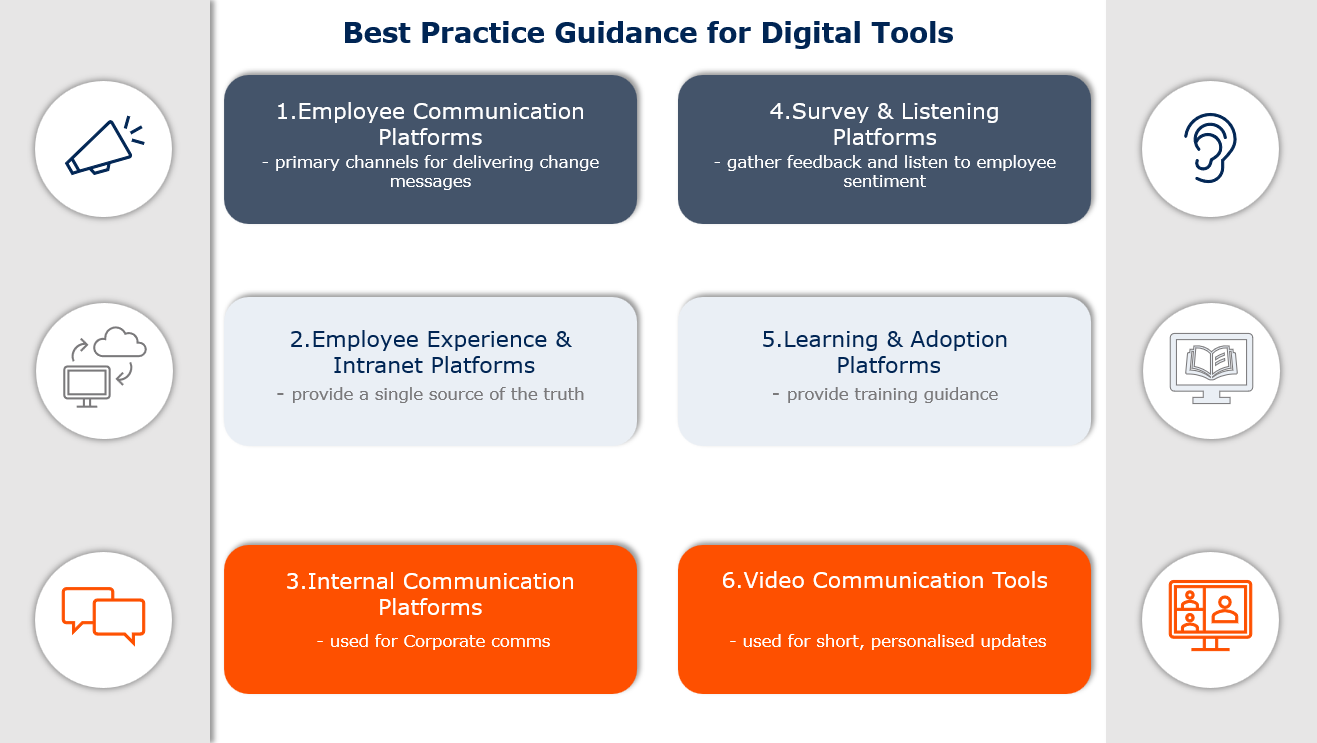
Best Practice Guidance for choosing digital tools
In the current market, there are several tools available and below is some guidance (although not exhaustive) on which tools to use:
Employee Communication Platforms:
facilitate frequent updates to employees to keep them up to date on the current status, progress, and major announcements.
Employee Experience and Intranet Platforms:
provide a central hub for all documents to be stored and managed, enabling employees to have access to the latest information.
Internal Communication Platforms:
are used to deliver tailored communications to target audiences and can be used to automate and schedule campaigns.
Survey and Listening Platforms:
are valuable tools to understand the employee experience, gather feedback and assess the level of adoption.
Learning and Adoption Platforms:
provide training guidance on how to use new tools to support employees in their transition while building their skills and capabilities.
Video Communication Tools :
are often used as an effective channel for communicating key messages with employees in a personalised manner.
Resource Libraries : Programme updates, Change roadmaps, Policies, Standard Operating Procedures, Training materials, FAQs
SharePoint
Microsoft Viva Connections
LumApps
Staffbase
Interact
Simpplr
Central change portal and document libraries
Provides a branded employee hub for news, resources, announcements, and change content
Modern digital workplace
Internal comms and employee app
Enterprise intranet platform
AI-powered employee experience platform
3. Internal Communication Platforms
Purpose
Software Options
Best For
Target specific audiences, schedule campaigns
Microsoft Viva Amplify
ContactMonkey
StaffBase
Firstup
Structured campaigns
Internal email campaigns with analytics
Campaign management
Personalised employee comms
4. Survey and Listening Platforms
Purpose
Software Options
Best For
Understanding employee sentiment
Microsoft Forms
Qualtrics
Microsoft Viva Glint
SurveyMonkey
Culture Amp
Slido
Change readiness assessment, employee listening and sentiment tracking and adoption measurement
Questions and interactive engagement during meetings
5. Learning and Adoption Platforms
Purpose
Software Options
Best For
Mandatory training, upskilling capabilities, system adoption
LinkedIn Learning
Microsoft Viva Learning
WalkMe
Whatfix
Self paced learning of broad range of professional skills and capabilities
Provides a continuous learning environment to reinforce learning
Digital Adoption guidance
In-App change support
6. Video Engagement Tools
Purpose
Software Options
Best For
Executive updates, Transformation launches,
Success Stories
Microsoft Stream
Teams recordings
Zoom recordings
Loom
Short videos are often more effective than lengthy written communications because employees can hear directly from leaders and understand the emotional context behind the change
Best Practice for choosing digital comms tools based on organisation size
When considering which tools to use, there is no universal one size fits all suite of tools for every organisation. Therefore, it’s advisable to match the complexity of the digital communication ecosystem based on:
the size of the organisation
the environment
the scale of the change
the maturity of the change capability within the organisation.
Introducing more tools than is needed will create unnecessary confusion and anxiety.
Below is some guidance for choosing the appropriate digital comms tools primarily based on the organisation size:
Small (<500 employees)
Characteristics
Purpose
Tools
Principles
Fewer organisational layers
Faster decision making
Limited comms resources
Leadership updates
Employee comms
Knowledge hub
Surveys/Feedback
Learning
Teams or Zoom
Email
SharePoint or Google Sites
Microsoft Forms
LinkedIn Learning
Keep comms clear, informal and frequent
Encourage direct conversations with leaders
Medium (500 – 5k employees)
Characteristics
Purpose
Tools
Principles
Multiple departments
Several locations
Growing need for structured comms
Small comms and change teams
Employee collaboration and comms
Employee Hub
Surveys
Learning
Teams
SharePoint
Forms/Qualtrics/Culture Amp
Viva Learning
Establish a formal change network
Create a dedicated change portal.
Introduce regular pulse surveys
Start measuring communication effectiveness
Large (5k – 20k employees)
Characteristics
Purpose
Tools
Principles
Multiple countries or divisions, significant stakeholder complexity
Dedicated comms and change teams
Employee collaboration and comms
Employee Hub
Surveys
Learning
Teams + Viva Site
SharePoint
Qualtrics/Culture Amp/Viva Glint
Viva Learning
Build a dedicated communications workstream
Segment audiences rather than organisation-wide messages
Build change champion networks.
Track awareness, understanding, sentiment and adoption metrics
Enterprise (20k+ employees)
Characteristics
Purpose
Tools
Principles
Multiple countries Complex transformation, mergers, restructures, ERP programmes
Dedicated internal comms and change functions
Employee collaboration and comms
Employee Hub
Digital Adoption
Employee Listening
Learning
Teams + Viva suite
SharePoint +Viva Connections
Walkme/Whatfix
Qualtrics/Glint
Viva Learning
Treat change communications as a product, not a project
Build audience segmentation by role, geography and impact level
Use analytics dashboards
Combine communications with digital adoption support
What is a project vs product?
Project
Product
Has a defined start and finish
Ongoing and continuously improved
Success measured by delivery of activities (emails sent, town halls held, newsletters published)
Success measured by outcomes (understanding, adoption, behaviour change, engagement)
Communications created for a specific change initiative
Communications treated as a long-term organisational capability
Temporary team and budget
Persistent team, roadmap and ownership
Requirements set mainly upfront
Continuously refined using feedback, analytics and employee insights
Regardless of the size, organisations which successfully deliver change will have a strong change communication ecosystem which provides:
A single source of the truth for information, typically SharePoint
One collaboration channel such as Teams.
One employee listening platform such as Qualtrics or Viva Glint.
Multi-channel communication (e.g. email, intranet, video, mobile)
Audience targeting to ensure messages are tailored for the different user groups
Two-way communication to enable open, honest conversations and further enhancements
This approach helps to ensure communication supports more than the initial awareness, but facilitates a greater understanding, engagement, adoption and sustainability of the change.
While technology enables good communication, remember it’s the people who will make the change successful. There is huge value gained from face-to-face human interaction where:
Executive sponsors reinforce the vision, frequently update their employees while encouraging two-way discussions and live Q & A sessions
Line managers lead from the front, adapt messages for local realities and provide forums to discuss any specific concerns
Change champions advocate for the change, capture feedback, share updates and support training.
Using human channels alongside digital tools leads to higher engagement, faster adoption, more sustainable change and the real value of the change being realised.
Do you need Change Management expertise?
At Project One, our team of experienced change and programme management professionals brings hands-on expertise to drive complex transformation programmes. We combine leadership, governance, and delivery capability to help customers achieve sustainable business performance improvements faster and with greater certainty. If you are embarking on or already delivering a transformation programme and would like some guidance or just a sounding board, please get in touch via theteam@projectone.com.

 How drama free is your change programme? take our free programme health check
 Our change and transformation Podcast Listen to our latest Podcast